
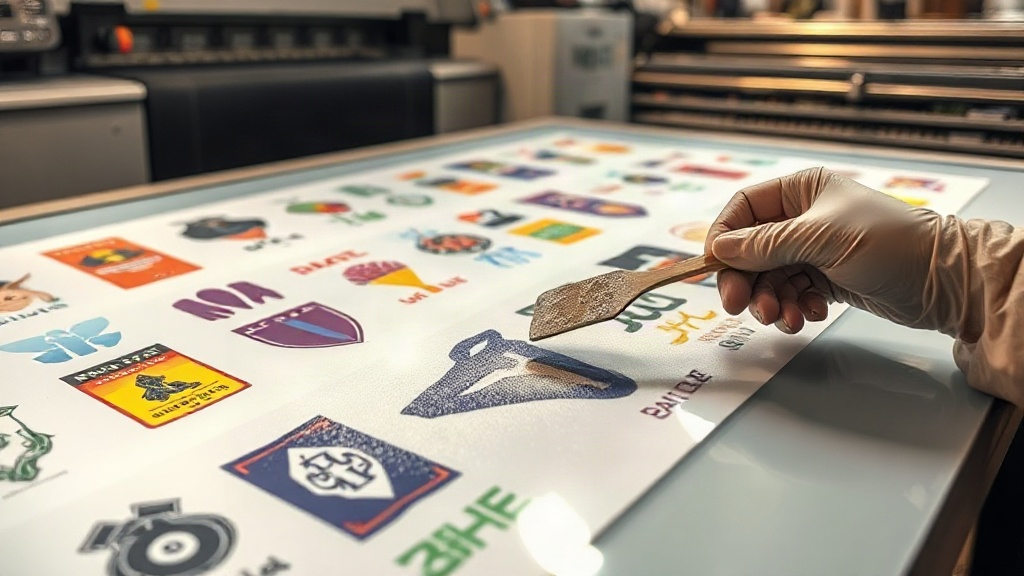
If you're in the custom apparel business, you've probably heard about DTF printing. It's a game-changer for transferring vibrant, detailed designs onto various fabrics. But did you know that how you arrange your designs on the film can make or break your efficiency and profitability? Enter the DTF gangsheet – a method that lets you print multiple designs in one go, saving time, money, and effort. In this guide, we'll dive deep into gangsheets: what they are, why they matter, and how to use them like a pro.
What Is a DTF Gangsheet?
A DTF gangsheet is a single sheet of DTF transfer film that contains multiple designs arranged together. Instead of printing each design individually, you nest them onto one large sheet, maximizing the use of the film. This approach is similar to gang printing in traditional offset printing, where multiple jobs are combined on one press sheet to reduce waste and cost.
In DTF printing, the process involves printing your designs onto a special film using DTF inks, applying a hot melt adhesive powder, and then curing the ink. The resulting transfer can be pressed onto garments. A gangsheet takes this a step further by allowing you to print many designs at once, which is especially useful for small to medium-sized orders.
Why Use a DTF Gangsheet?
The benefits of using gangsheets are numerous and can significantly impact your bottom line. Let's break them down.
Cost Savings
DTF film and ink are not cheap. By arranging multiple designs on one sheet, you minimize wasted space. This means you use less film and ink per design, lowering your cost per transfer. For example, if you have a bunch of small logos, you can fit dozens on a single sheet, dramatically reducing material expenses.
Time Efficiency
Printing one large gangsheet is much faster than printing each design separately. You set up the printer once, print the sheet, powder and cure it, and then you have all your transfers ready. This saves hours of repetitive work, allowing you to take on more orders or focus on other aspects of your business.
Consistency and Quality
When you print all designs in one batch, they go through the same conditions: same ink, same curing time, same powder application. This consistency ensures that every transfer in the gangsheet has the same quality, reducing the risk of variations that can occur when printing individually.
Eco-Friendly
Using less film means less waste. DTF film is not biodegradable, so reducing its usage is a step toward more sustainable printing practices. Additionally, less ink and powder are wasted, further minimizing your environmental footprint.
How to Create a DTF Gangsheet
Creating a gangsheet requires some planning and the right tools. Here's a step-by-step guide to help you get started.
Step 1: Gather Your Designs
Collect all the designs you need to print. They can be for different customers, different sizes, or different garments. Make sure each design is in a high-resolution format, preferably PNG with transparent background, and sized appropriately for the intended placement.
Step 2: Choose the Right Film Size
DTF film comes in various widths, typically 13 inches, 17 inches, 24 inches, etc., and you can cut lengths as needed. The size of your gangsheet depends on your printer's maximum width and the number of designs you want to include. For most desktop DTF printers, a 13x19 inch sheet is common, but you can go larger with industrial printers.
Step 3: Use Gangsheet Builder Software
You don't have to manually arrange designs in a graphics editor; there are dedicated gangsheet builder tools that automate the process. These tools allow you to upload your designs, specify quantities, and they'll automatically nest them onto a sheet with optimal spacing. Some popular options include Gangsheet Builder, DTF Gangsheet Maker, and even some RIP software with nesting features.
If you prefer manual arrangement, you can use Adobe Photoshop or Illustrator. Just create a canvas the size of your film, place your designs, and leave a small gap (about 0.25 inches) between them for easy cutting.
Step 4: Print, Powder, and Cure
Once your gangsheet is ready, print it using your DTF printer. After printing, apply hot melt adhesive powder evenly over the wet ink. Shake off excess powder, then cure the sheet in an oven or with a heat press. Follow your ink and powder manufacturer's recommendations for temperature and time.
Step 5: Cut and Store
After curing, your gangsheet is ready to use. Cut each design out, leaving a small border. You can store the transfers in a cool, dry place until you're ready to press them onto garments.
Best Practices for DTF Gangsheets
To get the most out of your gangsheets, keep these tips in mind.
- Optimize spacing: Leave enough space between designs for cutting, but not too much to waste film. A quarter-inch gap is usually sufficient.
- Group by color profile: If you have designs with similar color profiles, group them together to maintain consistent color output.
- Consider garment size: Arrange designs logically so that when you cut them, you can easily identify which transfer goes on which garment size.
- Test your settings: Before printing a full gangsheet, do a small test print to ensure your printer settings are correct for the film and ink you're using.
- Keep a digital archive: Save your gangsheet layouts. If you need to reprint, you can quickly reproduce the same arrangement.
Common Mistakes to Avoid
Even experienced printers make mistakes with gangsheets. Here are some pitfalls to watch out for.
- Overcrowding: Placing designs too close together can cause ink smudging or difficulty in cutting. Always maintain a safe gap.
- Inconsistent powder application: If powder is not applied evenly, some transfers may not adhere properly. Use a powder shaker for uniformity.
- Incorrect curing: Under-curing leads to wash-off, while over-curing can make the transfer brittle. Follow the recommended curing parameters.
- Ignoring film orientation: DTF film has a printable side and a non-printable side. Printing on the wrong side will ruin the sheet.
DTF Gangsheet vs. Individual Transfers
Is a gangsheet always better? Not necessarily. For large orders of a single design, printing individual transfers might be more straightforward. However, for small batches, mixed orders, or when you want to maximize efficiency, gangsheets are superior. They allow you to offer more products without increasing lead times.
Frequently Asked Questions
What is the maximum size for a DTF gangsheet?
The maximum size depends on your printer's capabilities. Desktop DTF printers typically handle sheets up to 13x19 inches, while industrial printers can go up to 24 inches wide and length as needed. Always check your printer's specifications.
Can I reuse a DTF gangsheet layout?
Yes, you can save your gangsheet layout in your design software or gangsheet builder tool. If you need to reprint the same combination of designs, simply load the layout and print again.
How do I price DTF gangsheet transfers?
Pricing should cover materials (film, ink, powder), labor, and overhead, plus profit. Calculate your cost per square inch of film and multiply by the area of each design. Add a markup for profit. Many printers charge per linear inch of film used.
Do I need special equipment to make gangsheets?
You need a DTF printer, DTF ink, DTF film, hot melt adhesive powder, and a curing oven or heat press. For arranging designs, a computer with design software or a gangsheet builder is necessary.
Is a DTF gangsheet suitable for small orders?
Absolutely. In fact, gangsheets are ideal for small orders because they allow you to combine multiple small designs into one print job, reducing setup time and material waste.
Mastering the DTF gangsheet can transform your printing business. It's a skill that pays off in reduced costs, faster turnaround, and happier customers. So next time you fire up your DTF printer, think about how you can gang up your designs for maximum efficiency.