
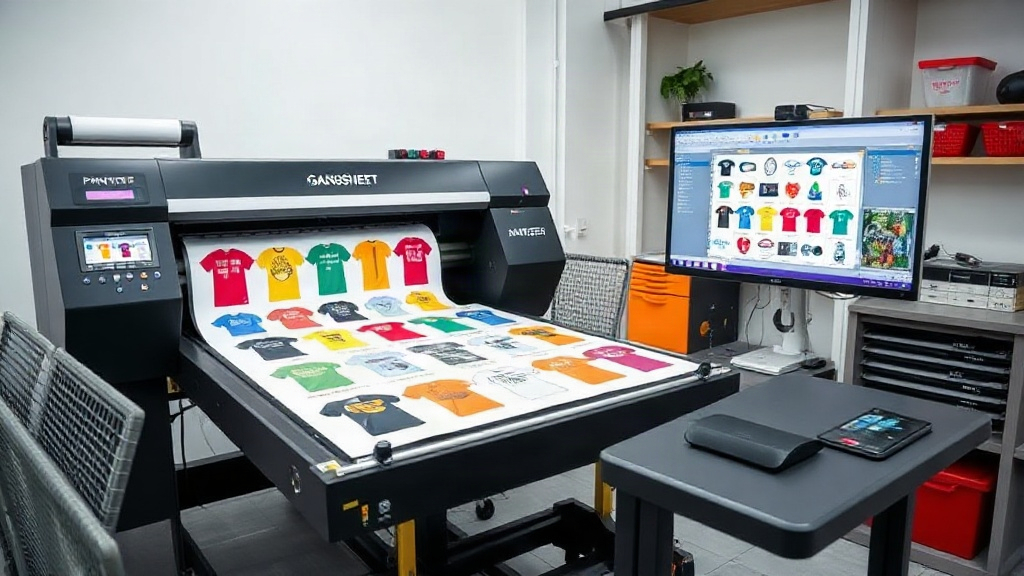
If you're in the custom apparel business, you've likely heard about DTF printing. It's a game-changer for producing vibrant, durable transfers on various fabrics. But as your orders grow, manually arranging designs on a sheet becomes a bottleneck. Enter the DTF gangsheet builder—a tool that automates layout, maximizes film usage, and saves you hours. In this guide, we'll explore what a gangsheet builder is, why it's essential, and how to use one effectively. Whether you're a seasoned pro or just starting, you'll find actionable tips to take your DTF printing to the next level.
What is a DTF Gangsheet Builder?
A DTF gangsheet builder is software that helps you arrange multiple designs onto a single sheet of DTF film. Instead of printing one transfer at a time, you gang multiple images together, hence the term 'gangsheet'. This approach is similar to gang printing in offset lithography, where multiple jobs are combined to save time and materials. With a builder, you can upload your artwork, set the quantity for each design, and let the software automatically nest them for optimal use of space.
Most builders also allow manual adjustments, so you can fine-tune the layout. Some advanced tools even calculate ink usage and film length, giving you a clear picture of your costs. The result? Less waste, faster production, and happier customers.
Why You Need a DTF Gangsheet Builder
If you're still manually placing designs in a graphics editor, you're likely wasting time and film. Here's why a dedicated builder is a smart investment.
Time Savings
Manually arranging dozens of designs can take hours. A builder automates the process, reducing it to minutes. You can focus on other tasks like marketing or customer service.
Cost Reduction
DTF film and ink aren't cheap. By nesting designs efficiently, you use less film per transfer. Over hundreds of prints, the savings add up significantly.
Consistency and Quality
Automated tools ensure consistent spacing and alignment. This reduces the risk of errors like overlapping designs or uneven cuts, which can lead to wasted transfers.
Scalability
As your business grows, manual methods can't keep up. A builder allows you to handle larger volumes without hiring more staff or working overtime.
Key Features to Look for in a DTF Gangsheet Builder
Not all builders are created equal. Here are the features that matter most.
Automatic Nesting
The core function: the ability to automatically arrange designs to minimize wasted space. Look for algorithms that handle irregular shapes well.
Manual Editing
Sometimes you need to tweak the layout. A good builder lets you drag, rotate, and resize designs manually.
Support for Multiple File Formats
You'll likely work with PNG, JPG, PDF, and vector files. Ensure the builder supports your typical formats.
Integration with DTF Printers
Some builders can send jobs directly to your printer, streamlining the workflow.
Cost Calculation
Tools that estimate ink and film usage help you price your products accurately.
Cloud-Based vs. Desktop
Cloud-based builders offer flexibility and collaboration, while desktop versions may be faster and more secure.
How to Use a DTF Gangsheet Builder: Step-by-Step
Ready to get started? Follow these steps to create your first gangsheet.
- Upload Your Designs: Import your artwork into the builder. Most tools support drag-and-drop.
- Set Quantities: Specify how many of each design you need. The builder will duplicate them accordingly.
- Choose Sheet Size: Select the dimensions of your DTF film. Common sizes are 13x19 inches or 22x60 inches for roll-fed printers.
- Auto-Arrange: Hit the auto-nest button. The software will pack designs tightly, often with a small gap for cutting.
- Manual Adjustments: Review the layout. If needed, move designs to fill gaps or avoid problem areas.
- Add Cut Lines: Some builders automatically add cut lines around each design. If not, you may need to add them manually.
- Export and Print: Save the gangsheet as a high-resolution file (typically PDF or PNG) and send it to your DTF printer.
Best Practices for DTF Gangsheet Layout
To get the most out of your builder, keep these tips in mind.
Group Similar Sizes
Nesting works best when designs are of similar dimensions. Mixing large and small items can lead to inefficient use of space.
Leave a Margin
DTF printers need a small border for handling. Leave at least 0.25 inches around the edges.
Consider Ink Coverage
Designs with heavy ink coverage take longer to print and cure. If possible, balance high-coverage designs with lighter ones to maintain consistent production speed.
Test Print First
Before committing to a full gangsheet, print a small test to check colors and alignment.
Keep a Library
Save frequently used gangsheet layouts as templates. This speeds up future orders.
Common Mistakes to Avoid
Even with a builder, these pitfalls can cost you time and money.
- Overcrowding: Packing designs too tightly can cause cutting errors. Always leave a gap.
- Ignoring Print Direction: Some DTF printers have a preferred orientation. Ensure your designs are rotated correctly.
- Forgetting to Mirror: DTF transfers are typically printed mirror-image. Check your builder's settings.
- Using Low-Resolution Files: Garbage in, garbage out. Always use high-res artwork (300 DPI or higher).
- Not Updating Software: Builders improve with updates. Keep yours current for the best nesting algorithms.
DTF Gangsheet Builder vs. Manual Layout: A Comparison
Still on the fence? Here's a quick comparison.
- Time: Manual layout can take 30+ minutes per sheet; a builder does it in under 5.
- Film Usage: Manual often wastes 20-30% more film due to inefficient nesting.
- Error Rate: Manual layouts are prone to human error; builders reduce mistakes.
- Scalability: Builders handle high volumes effortlessly; manual methods become impractical.
Frequently Asked Questions
What is the difference between a gangsheet and a regular DTF transfer?
A gangsheet contains multiple designs on one film, while a regular transfer is a single design. Gangsheets are more efficient for production runs.
Can I use any DTF printer with a gangsheet builder?
Most builders export standard file formats, so they work with any DTF printer. However, some builders integrate directly with specific printer models for added convenience.
How do I calculate the cost of a gangsheet?
Cost depends on film length, ink usage, and labor. Many builders provide estimates. For accurate pricing, factor in your material costs and printer settings.
Is a cloud-based gangsheet builder secure?
Reputable cloud builders use encryption and secure servers. If you're concerned, look for options with two-factor authentication and data privacy policies.
Can I reuse gangsheet layouts?
Yes, most builders let you save templates. This is ideal for repeat orders or popular design combinations.
By incorporating a DTF gangsheet builder into your workflow, you'll streamline production, reduce costs, and scale your business. Start with a free trial of a popular builder to see the difference. Your future self will thank you.